A surf journal for iPhone
Track the feeling, not just the forecast.
Tag how every session felt in 30 seconds. Swell Feels fills in the tide, swell and wind, then shows you how your spots, boards and crews shape the way you feel and surf.
Swell Feels is iPhone only for now.
Free for your first 5 sessions. Then $14.99 once.
- 2,000+surf spots in 98 countries
- 40feelings, plus your own words
- 30 secto log a session
- $14.99one-time purchase, no subscription, no ads
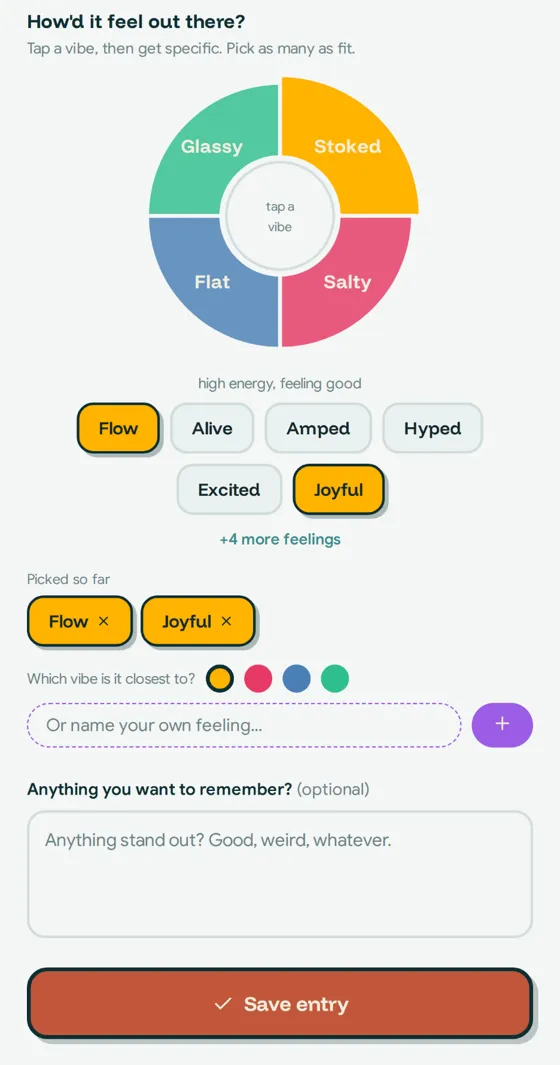
How'd it feel out there?
Tap a vibe, then pick as many as fit.
Try it
Four vibes. One tap.
Every session starts with how it felt: high or low energy, feeling good or off. Pick the vibe that fits, get specific with a feeling or two, and name your own if none of them land.
Stokedhigh energy, feeling good
Saltyhigh energy, feeling off
Glassylow energy, feeling good
Flatlow energy, feeling off
How it works
Paddle in, tap, done.
Tap how it felt
Pick a vibe and a few feelings. Add your board, who you paddled out with, and a note if you want one.
Conditions fill themselves in
Pick your spot and the time. Tide, swell, wind and water temp land on their own.
Rising tide · 3-4 ft WNW @ 13s · light offshore · 64°F waterExample entry, Swami's, 6:40 amPatterns show up
After a handful of sessions you'll start to see what lifts you, what drags you down, and how it shows up in your surfing.


Patterns
Your surf, in patterns.
Spots and tidesWhich breaks and tides leave you feeling good, and which don't.
Boards and crewHow your quiver and who you paddle out with change the session.
Your rhythmSee how many of the last 8 weeks you got in the water, and whether you're surfing more or less than usual this month.
Example pattern
Swami's leans toward Joyful. 3 of 3 sessions felt good.
Example from the demo journal
Built by a surfer
I'm a surfer. I always knew the swell, the tide and the wind, but not how a session actually made me feel. Over time I noticed that how I felt in the water changed how I surfed. So I built a journal to track the feeling, not just the forecast.
Privacy
Your journal is yours.
What you log stays between you and the app.
Only you can see it
Sessions are tied to your account. Nobody else can read them, including other users.
No ads
No ad trackers, and we don't sell your data or share it for marketing.
Location stays on your phone
Used only to list breaks near you. It isn't saved or sent anywhere.
Export anytime
Download everything as a spreadsheet or a full backup, whenever you want.
Delete in the app
Delete your account and everything in it from Settings. No email required.
Share only on purpose
Share images are made on your phone, only when you tap Share.
Pricing
Try 5 sessions free. Then pay once.
Log your first 5 sessions free. If you want to keep going, unlock Swell Feels with one payment. No subscription.
- Unlimited sessions
- Every pattern and progress view
- Auto conditions for 2,000+ spots
- Share images, export and backup
Not ready to unlock? Your past sessions and patterns stay open.
FAQ
Questions from the lineup.
Is it free?
Your first 5 sessions are free. After that, Swell Feels Unlock is a one-time $14.99 purchase. There's no subscription.
Is there an Android version?
Not yet. Swell Feels is iPhone only for now.
Where do the conditions come from?
Tides come from NOAA predictions, and swell, wind and water temperature come from Open-Meteo. They're for your records only, not for deciding whether it's safe to go out.
Who can see my sessions?
Only you. Your journal is stored privately in your account so it's there on a new phone, and you can export or delete it anytime.
Is this therapy?
No. Swell Feels is a personal surf journal for reflection. It isn't therapy or medical care.
What if I already paid?
Tap Restore purchase in Settings. Your unlock follows your Apple ID, so it works on a new phone too.
What if I don't unlock?
Everything you've already logged stays yours to read, browse and export.
Paddle out. Track the feeling.
Your first 5 sessions are on us.
Swell Feels is iPhone only for now.